Shopify direct mail for your next win-back campaign
October 16, 2026
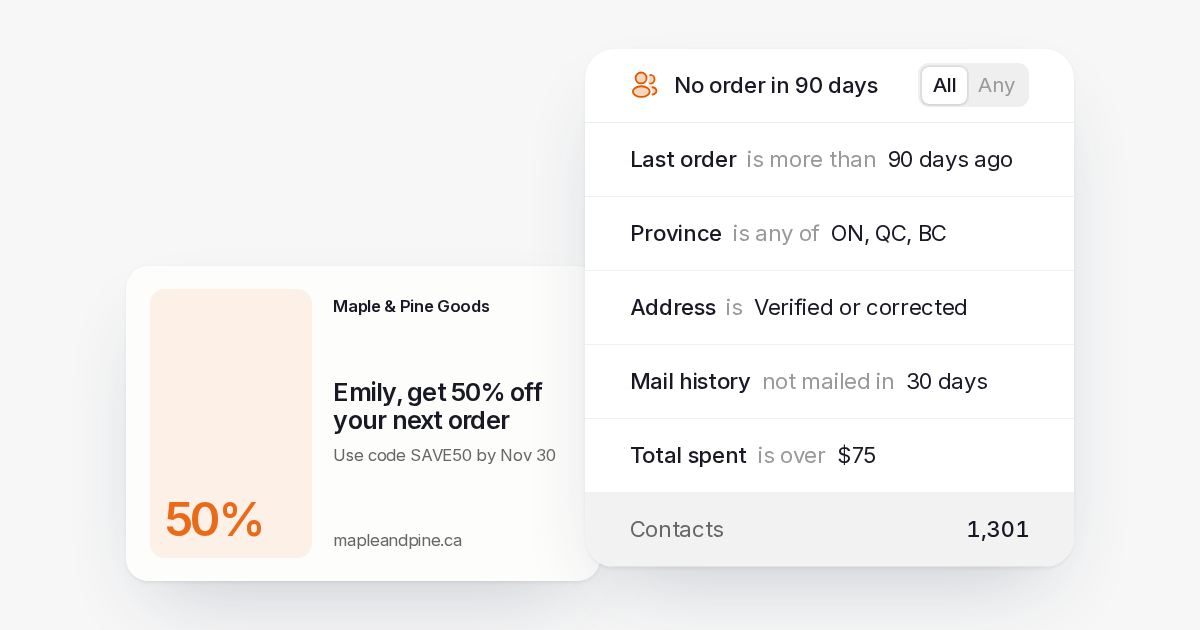
Plan Shopify direct mail for past customers in Canada. Choose an audience, prepare a win-back postcard and compare orders with a group you leave unmailed.
Shopify direct mail can give past customers a reason to shop with you again. Start with people who have moved beyond your usual repeat-purchase window, send an offer that fits their relationship with your store and keep an unmailed group for comparison.
Direct Mailer does not have a Shopify app or native integration. You can export customers, import an addressed list and schedule a campaign in the web app. A developer can also build a workflow in your own software using the API.
The customer list and campaign decisions stay yours. We handle the address checks, printing and postage.
Choose customers who have a reason to return
A win-back audience should reflect how people buy from your store. Look at your own repeat-order history before deciding when a customer has lapsed.
Someone who buys a consumable may return on a different schedule from someone who bought a lasting household item. A blanket “inactive” rule can mix customers who need a reminder with customers who have no reason to reorder yet.
Review last-order dates, order value and products purchased. Then decide which records belong in the mailing. Exclude people with unresolved service problems, customers who asked you to stop mailing and addresses you cannot use for the campaign.
Keep customer data current before creating the send. A customer who bought again after your export may no longer need the same win-back offer.
Prepare a mailing list from your store data
Shopify explains how to export customer profiles to CSV. Check the exported columns before assuming the file contains everything your campaign needs.
A customer address export is not a complete history of order timing. If your selection depends on last-order dates or product purchases, obtain those details from your authorized reporting or developer workflow and match them to the customer records.
In Direct Mailer, import the CSV and map names, address lines, city, province and postal code. Keep unit numbers. Map purchase details you want to use for selection into suitable custom fields.
Review address corrections and failed rows. A formatting check can catch postal code and province problems, but it does not confirm that the customer still lives at an old shipping address.
Save the audience as a list or segment. Do-not-mail contacts and failed addresses are excluded from list and segment sends.
Match the timing to your offer
Choose your mailing window from your own customer history and give people enough time to use the offer.
Allow for preparation, printing and Canada Post transit before an offer expires. Direct Mailer shows Mailed and an estimated arrival; it does not promise a printing turnaround or confirm delivery to the customer.
Avoid writing a postcard that only makes sense on a single arrival day. A product reminder or invitation with a workable response window gives the customer time to act after collecting their mail.
If you are preparing a seasonal campaign, check that your stock, landing page and customer support arrangements will still fit when recipients respond.
Give the postcard a clear job
Your customer should understand why you mailed and what to do next. Choose a main message rather than filling the card with every product you sell.
A win-back postcard might introduce a relevant collection, remind someone about a product they buy again or offer a reason to revisit the store. Use an incentive only if your margins and offer terms support it.
Keep the headline, product image and next action easy to find. Your store name and contact details should be recognizable from the customer’s earlier purchase.
Personalization can start with a name and a message suited to the audience. Review the merged content before sending, including blank fields and long names. Direct Mailer prints the artwork you provide; it does not design your card or choose products for the recipient.
Use a landing page or offer that you can support in your own store. Direct Mailer does not provide QR engagement tracking or match store purchases to postcards.
Schedule the mailing or build your own workflow
You can import your customers and schedule win-back postcards without building a store connection. Choose the saved audience, prepare the artwork and set the send date.
Recipients are captured when you create the campaign. A scheduled mailing does not automatically refresh its audience on the send day. Review the source data before creating it, especially if your store has been active since the export.
For a developer-built workflow, your software needs to obtain the customer data, apply your win-back rule and submit the intended mailing through the Direct Mailer API. Store credentials on the server and restrict access to customer addresses.
Keep a record of which customer and campaign each request represents. Reuse an idempotency key when retrying that intended send, so an interrupted request does not produce duplicate postcards.
This is a custom workflow you maintain. Direct Mailer does not watch Shopify orders, start a built-in cart-abandonment flow or create recurring sends for you.
Connect the card to your email follow-up
If email fits the campaign, keep the message consistent with the card. Check the customer’s email permissions separately before adding a promotional follow-up.
Your developer can use direct mail webhooks to receive the Mailed event and plan an email in your own system using the estimated arrival. The event does not mean the customer has collected or read the card.
Verify webhook signatures and handle repeated events once. A retry should not cause another email or another mailing.
Returned mail comes back to the return address you provide. Mark it returned in Direct Mailer so the contact is marked do not mail, then review the address in your customer records.
Budget for the whole campaign
Your mailing cost depends on the audience size, postcard format and plan. Direct Mailer’s per-piece rate includes printing, addressing and postage, paid from your prepaid balance.
Include any work you commission for artwork, your offer’s effect on margin and your own developer costs when deciding whether the campaign makes sense.
Compare expected contribution from additional orders with the cost of contacting the audience. A campaign can generate orders without generating enough additional profit to justify repeating it.
Start with an audience you can serve and a budget you are willing to test. A smaller audience only helps if the result can still answer the question you are testing.
Compare orders with customers you leave unmailed
Before sending, randomly assign eligible customers to a mailed group and an unmailed group. Save the assignments in your own records and define the response period before looking at sales.
Keep other campaign activity comparable if you want to estimate the postcard’s added effect. If only the mailed group also receives a special email, the comparison measures that combination.
Compare outcomes per customer rather than raw group totals when group sizes differ. Use profit after relevant costs to assess the business result, and avoid treating every order from a mailed customer as an order caused by the postcard.
Direct Mailer reports mailing activity and spend. You measure customer orders and the comparison in your own store or analysis. A small difference in a small audience may leave the result uncertain.
Use customer data for the purpose you explain
Canada’s rules for electronic marketing and the use of personal information need separate consideration.
The CRTC’s CASL guidance describes requirements for commercial electronic messages such as promotional email. A physical postcard does not make a follow-up email exempt from those requirements.
The Office of the Privacy Commissioner’s consent principle explains consent for collecting, using and disclosing personal information under PIPEDA. Check the purposes you explained when you collected an address, applicable privacy law and how customers can withdraw consent. Have your privacy or legal adviser review the planned use when needed.
Keep preferences current across the records you use for the campaign.
Give the next mailing its own customer goal
Win-back is one use for ecommerce direct mail. A thank-you for a recent purchase, a relevant replenishment reminder or an invitation for loyal customers can call for a different audience and message.
Prepare each campaign from current records. Before reusing a segment, check who now qualifies, what they last received and whether the next postcard offers them a useful reason to return.